Mobile App Design
Simplifying Late Night Navigation for Tipsy Users

Buzzi is a mobile app concept created for a design challenge organized by Moonchild.ai. The product focuses on minimal interaction, transparent pricing, and safety features tailored to users who might be tipsy or distracted.
Buzzi is a mobile app concept created for a design challenge organized by Moonchild.ai. The product focuses on minimal interaction, transparent pricing, and safety features tailored to users who might be tipsy or distracted.
Role
UX/UI Designer
Timeline
6 Oct 2025 - 20 Oct 2025
Skills
End-to-end design
User Research
Design Systems
Prototyping
Step 1
Research
Understanding the users
The first step in my process was understanding the users and their needs.
The first step in my process was understanding the users and their needs.
The primary target group was younger adults (aged 21–35) who lead an active nightlife, people who frequently go out to clubs, bars, or concerts, and occasionally drink alcohol.
The primary target group was younger adults (aged 21–35) who lead an active nightlife, people who frequently go out to clubs, bars, or concerts, and occasionally drink alcohol.
While most of them are responsible, they’re still aware of the risks of driving under the influence and are therefore looking for a safe, reliable, and effortless way to get home at the end of the night.
While most of them are responsible, they’re still aware of the risks of driving under the influence and are therefore looking for a safe, reliable, and effortless way to get home at the end of the night.
Since I personally belong to this demographic, I reached out to a few of my friends and conducted short, in-person interviews with two of them. Each interview included seven questions focused on understanding their behaviors, frustrations, and expectations in these situations.
Since I personally belong to this demographic, I reached out to a few of my friends and conducted short, in-person interviews with two of them. Each interview included seven questions focused on understanding their behaviors, frustrations, and expectations in these situations.
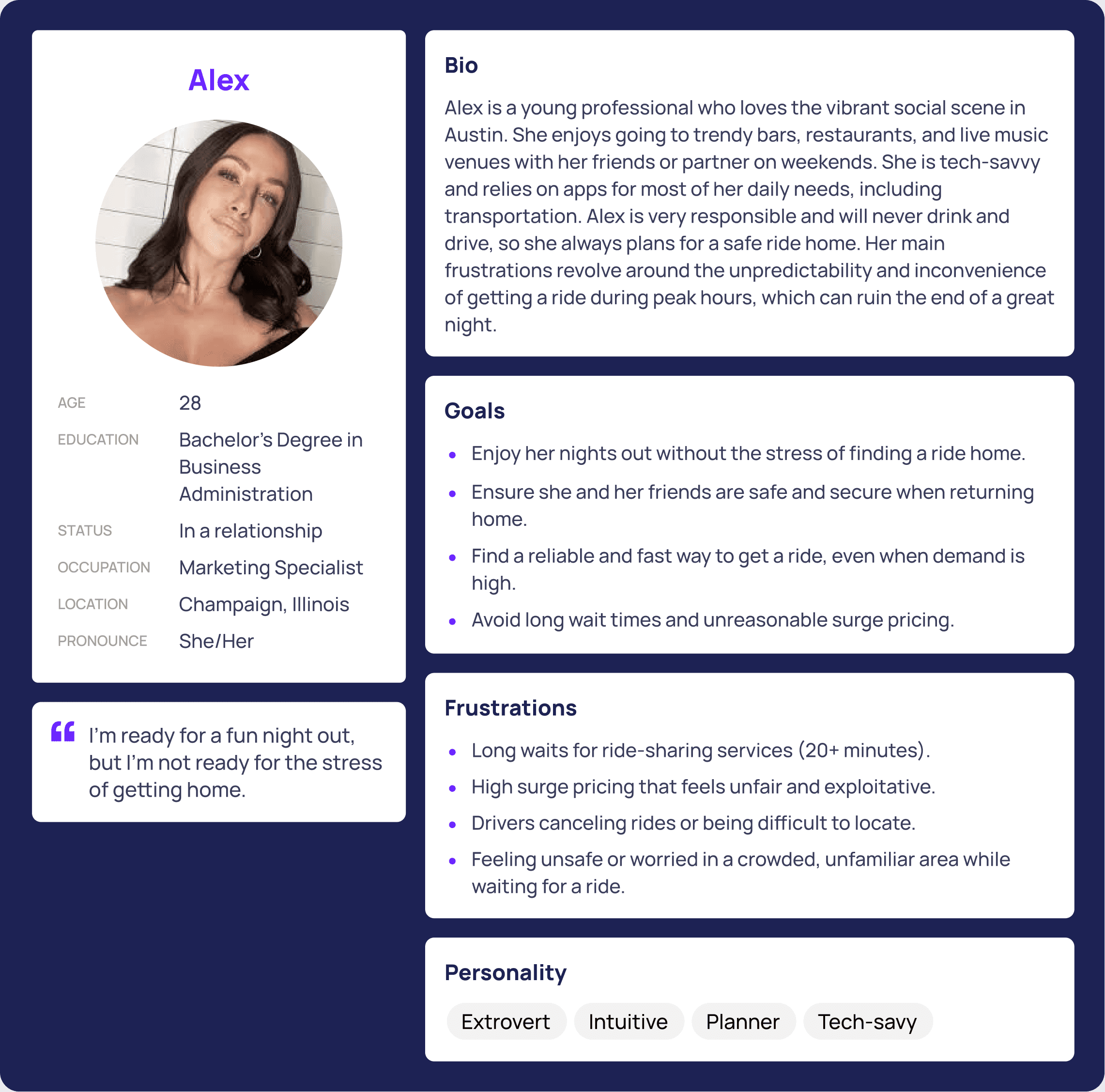
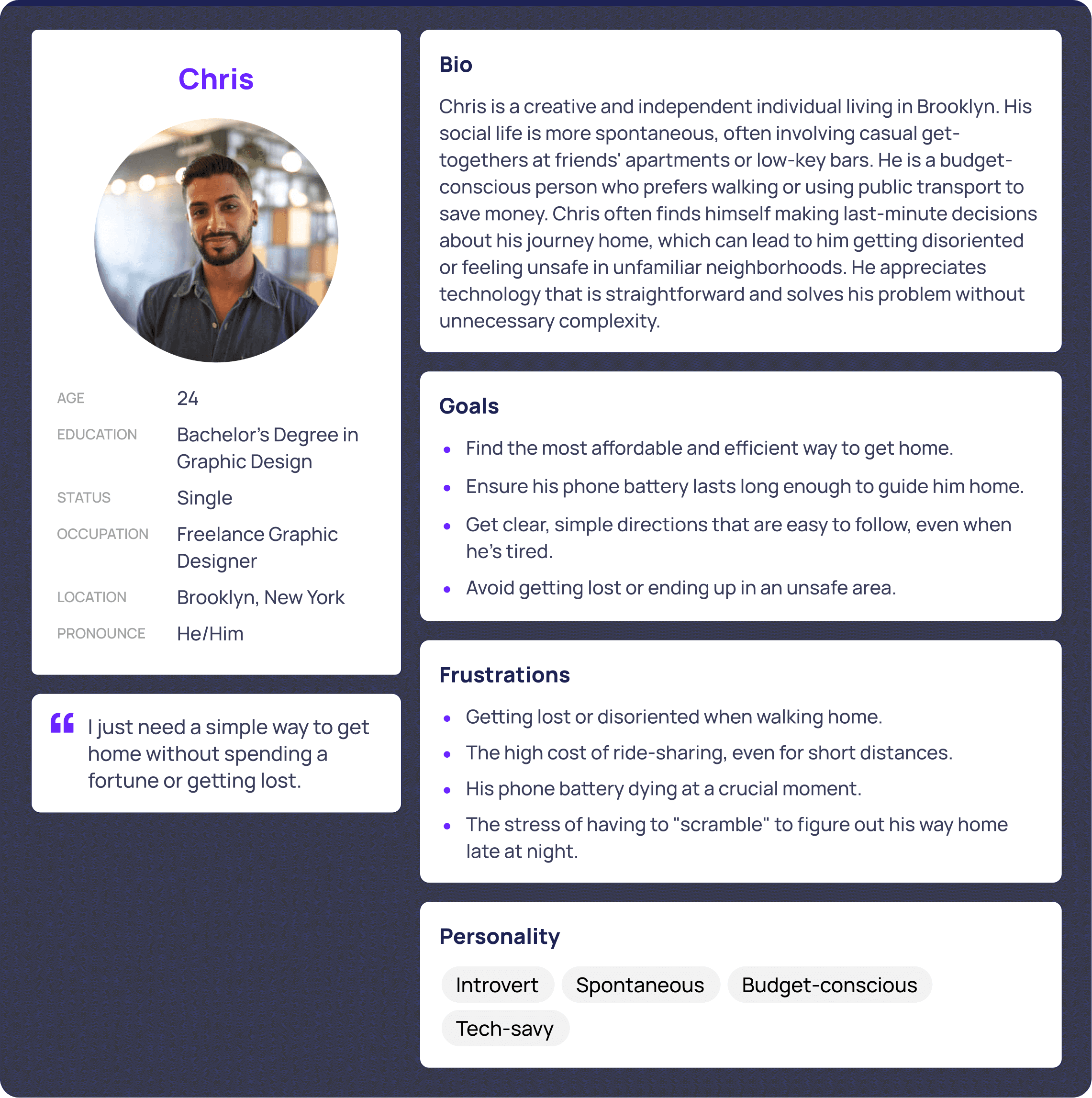
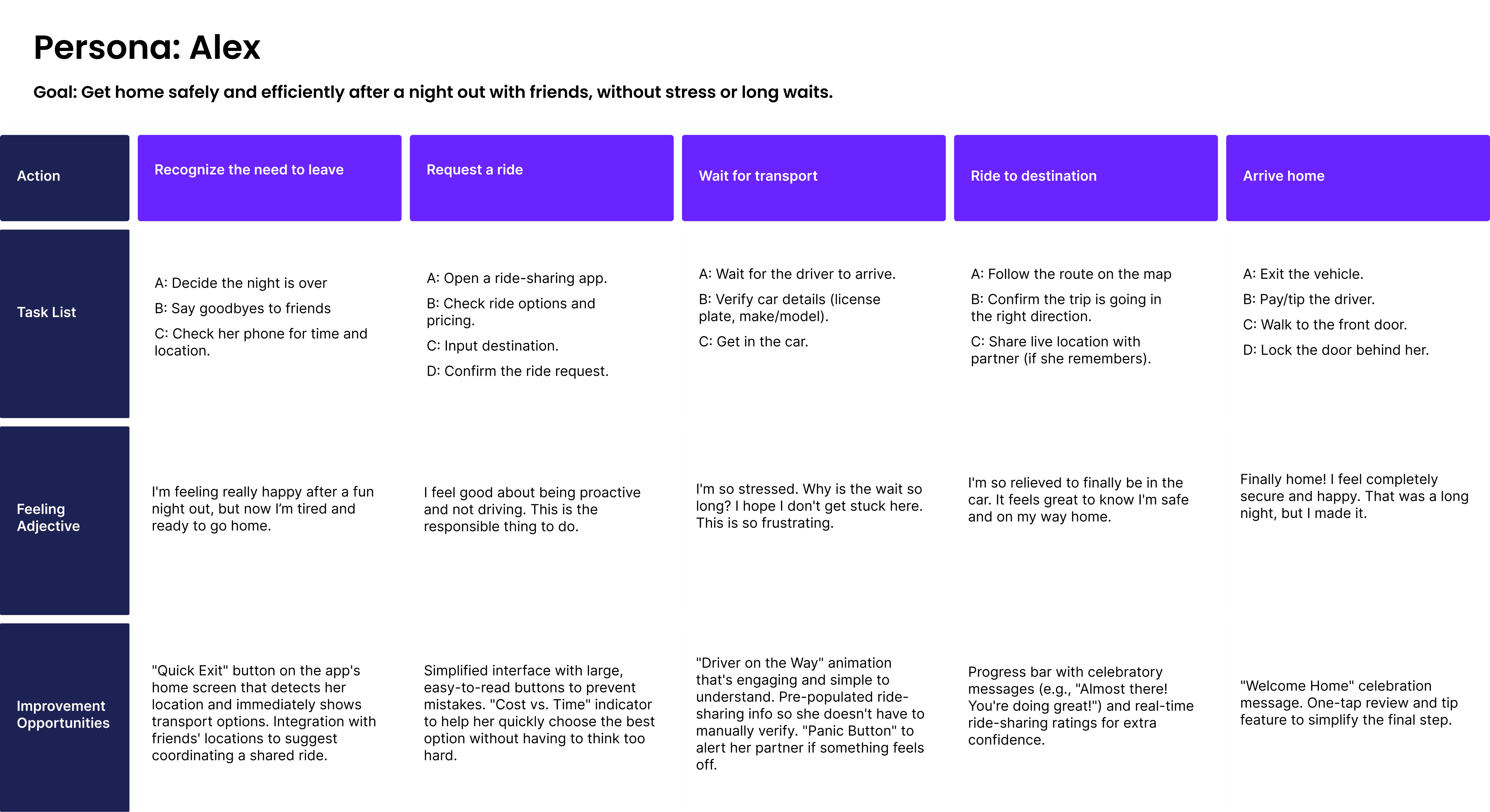
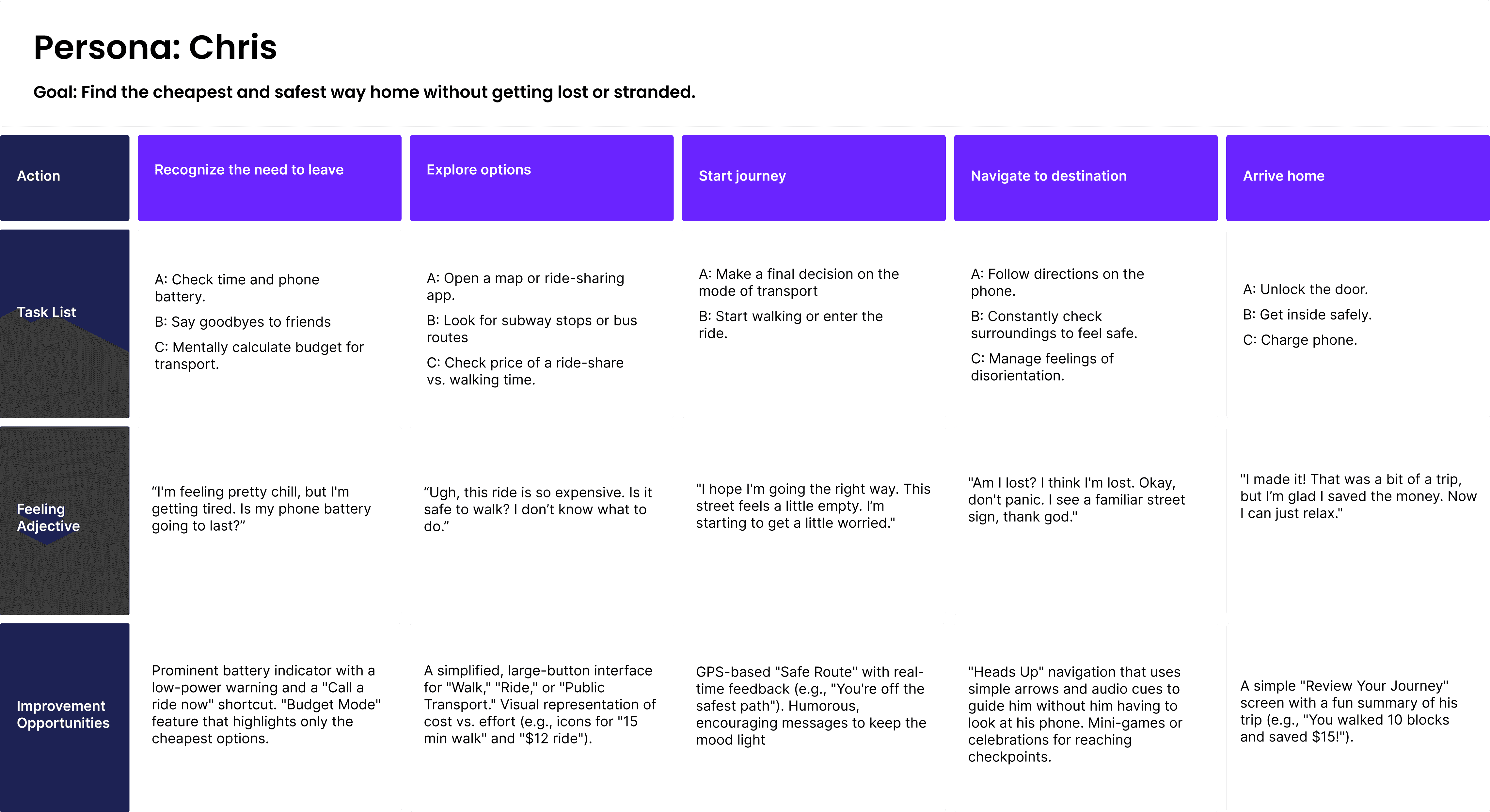
Based on the findings, I synthesized the insights using Empathy Maps, defined two key User Personas, and created User Journeys for each, to visualize every step they take from leaving a party to getting home, and to identify opportunities for improvement.
Based on the findings, I synthesized the insights using Empathy Maps, defined two key User Personas, and created User Journeys for each, to visualize every step they take from leaving a party to getting home, and to identify opportunities for improvement.
Competitive Analysis
Next, I conducted a quick competitive analysis to understand the existing landscape. Due to time constraints, I focused on two key competitors:
Next, I conducted a quick competitive analysis to understand the existing landscape. Due to time constraints, I focused on two key competitors:
Uber
A global ride-booking app and a direct competitor to Buzzi.
Its strengths are a professional and polished design and a simple payment process. However, it’s not designed for users who are under the influence or not fully focused, which can make the experience confusing or tiring in such situations.
A global ride-booking app and a direct competitor to Buzzi.
Its strengths are a professional and polished design and a simple payment process. However, it’s not designed for users who are under the influence or not fully focused, which can make the experience confusing or tiring in such situations.
DrunkMode
A smaller app that prevents users from making decisions while intoxicated by blocking calls and messages. While it’s not a ride-hailing app, it targets the same audience and uses a friendly, humorous tone. Its strengths are its unique personality and simple interface; however, it lacks depth in functionality and its interface feels outdated.
A smaller app that prevents users from making decisions while intoxicated by blocking calls and messages. While it’s not a ride-hailing app, it targets the same audience and uses a friendly, humorous tone. Its strengths are its unique personality and simple interface; however, it lacks depth in functionality and its interface feels outdated.
From this analysis, I realized that none of the competitors combine extreme simplicity with a fully reliable navigation and ride experience, and that gap represented an opportunity for Buzzi.
From this analysis, I realized that none of the competitors combine extreme simplicity with a fully reliable navigation and ride experience, and that gap represented an opportunity for Buzzi.
Step 2
Ideation
How Might We
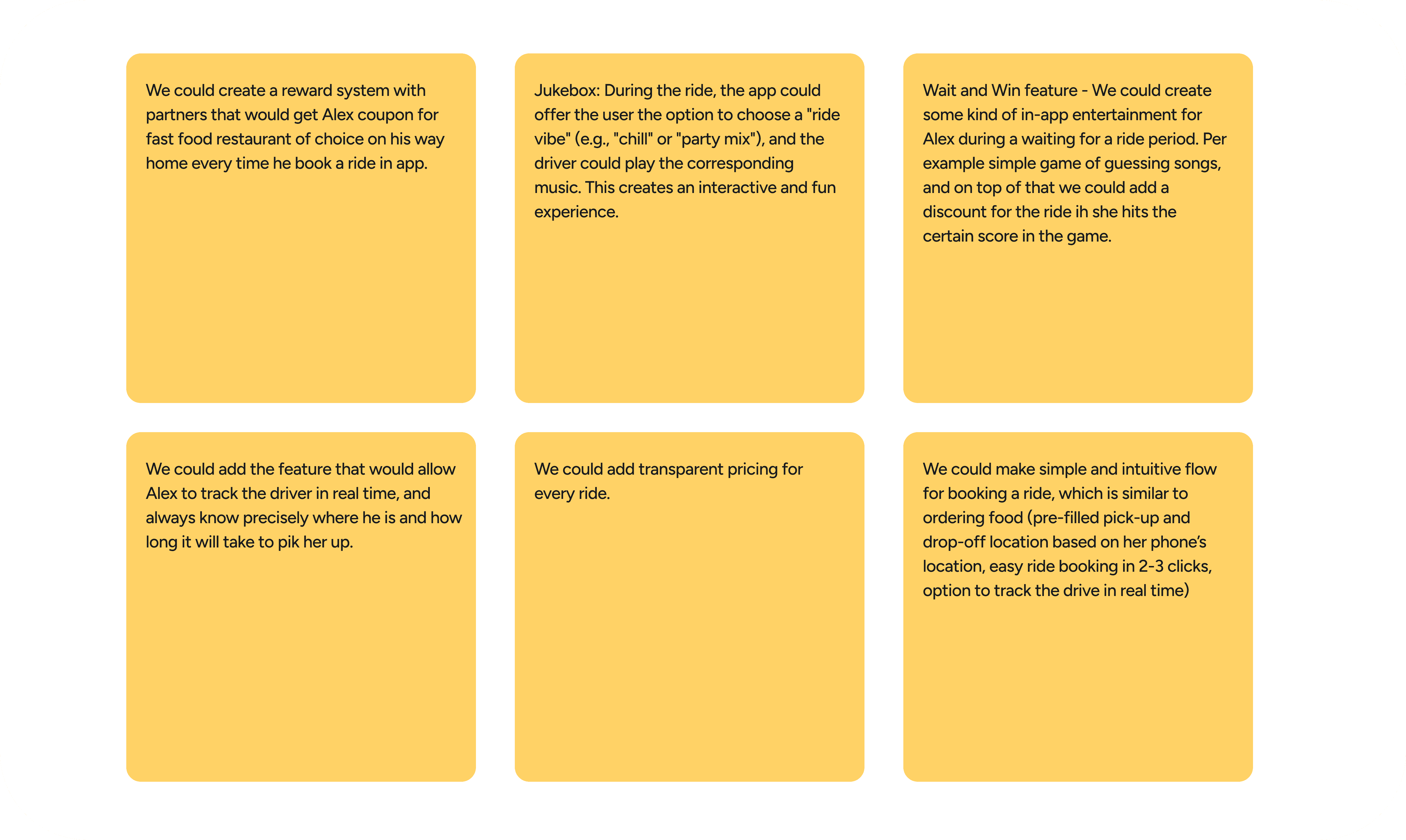
After completing the research phase, I moved on to ideation. I used the How Might We method to explore a wide range of ideas that could solve the problems uncovered during interviews. I also collected visual and functional references from similar products to broaden my perspective and start shaping the visual direction for the app.
After completing the research phase, I moved on to ideation. I used the How Might We method to explore a wide range of ideas that could solve the problems uncovered during interviews. I also collected visual and functional references from similar products to broaden my perspective and start shaping the visual direction for the app.
Step 3
Design System
Consistent visual identity
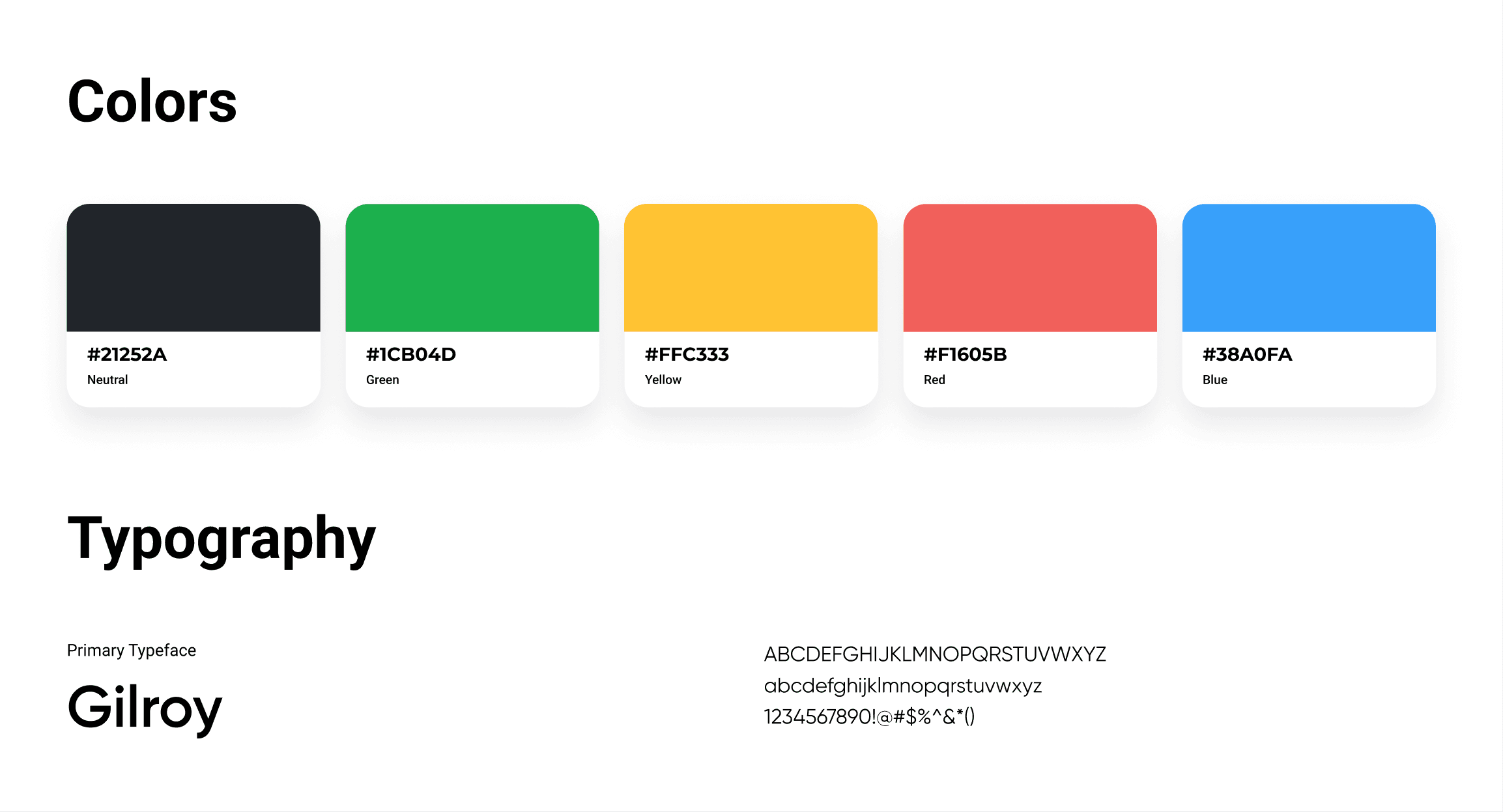
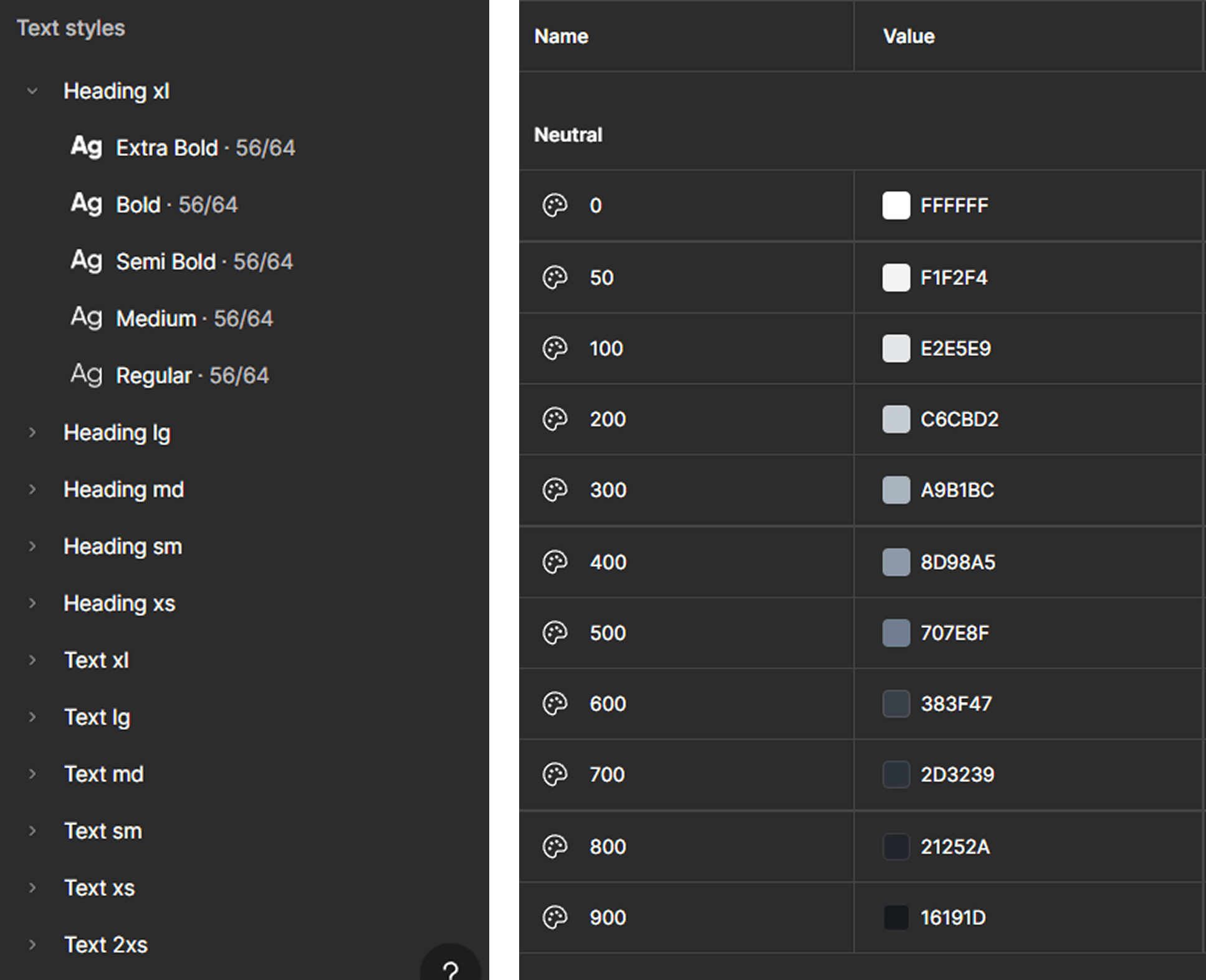
The next step was defining the branding and design system. I built a scalable foundation by creating a color palette with 10 shades for each primary color and a typography scale ranging from Heading XL to Text 2XS. This allowed me to ensure visual consistency across all screens and maintain a strong, recognizable identity.
The next step was defining the branding and design system. I built a scalable foundation by creating a color palette with 10 shades for each primary color and a typography scale ranging from Heading XL to Text 2XS. This allowed me to ensure visual consistency across all screens and maintain a strong, recognizable identity.
Step 4
Main Features
Simple and clear Home screen
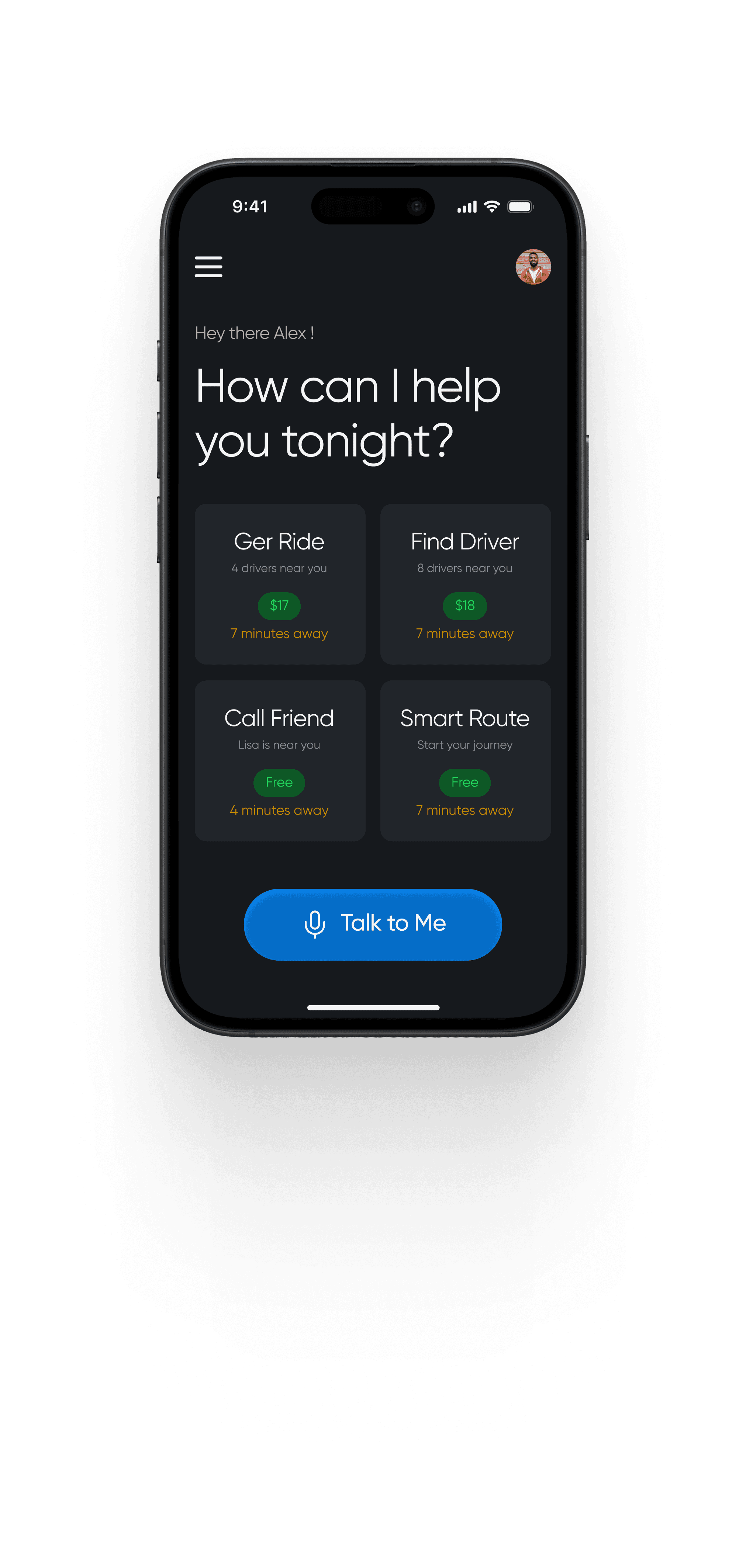
The Home screen presents four main transport options, each showing the estimated price and arrival time upfront.
The Home screen presents four main transport options, each showing the estimated price and arrival time upfront.
This gives users instant clarity, helping them choose based on their distance and budget, even when they’re not fully focused.
This gives users instant clarity, helping them choose based on their distance and budget, even when they’re not fully focused.
Additionally, a voice command button allows hands-free interaction, minimizing the need for complex navigation or typing.
Additionally, a voice command button allows hands-free interaction, minimizing the need for complex navigation or typing.
This layout emphasizes the key action - booking a ride, and removes all unnecessary distractions.
This layout emphasizes the key action - booking a ride, and removes all unnecessary distractions.
Booking a Ride or Driver
The core flow of the app revolves around getting the user home safely, whether by booking a ride or hiring a professional driver to take them and their car home. Both experiences share the same intuitive interface, built for speed, clarity, and zero confusion, even when users are tired or under the influence.
The core flow of the app revolves around getting the user home safely, whether by booking a ride or hiring a professional driver to take them and their car home. Both experiences share the same intuitive interface, built for speed, clarity, and zero confusion, even when users are tired or under the influence.
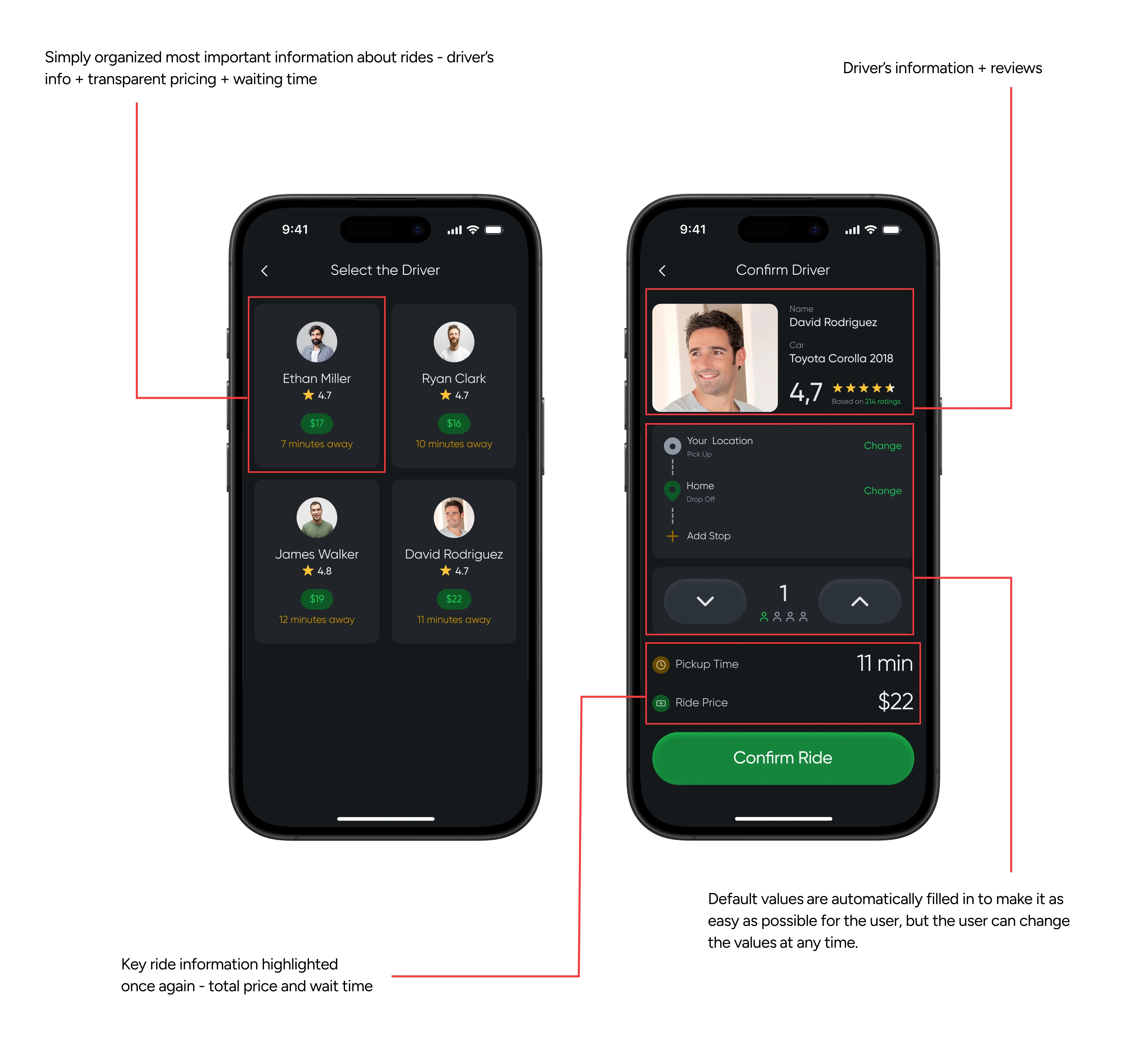
The app continuously tracks the user’s location and displays available drivers nearby, along with key information such as estimated price, waiting time, driver rating, and car details. Everything is visible at a glance, removing one of the biggest pain points uncovered during research: the uncertainty around cost and availability.
The app continuously tracks the user’s location and displays available drivers nearby, along with key information such as estimated price, waiting time, driver rating, and car details. Everything is visible at a glance, removing one of the biggest pain points uncovered during research: the uncertainty around cost and availability.
Once a driver is selected, the app automatically fills in pickup and drop-off locations and the number of passengers, allowing for a one-tap confirmation. Users can still edit any details if needed, but the default setup ensures the process is as effortless as possible.
Once a driver is selected, the app automatically fills in pickup and drop-off locations and the number of passengers, allowing for a one-tap confirmation. Users can still edit any details if needed, but the default setup ensures the process is as effortless as possible.
Before confirming, the app once again summarizes all relevant details - total cost, waiting time, and driver info, maintaining full transparency throughout the process.
Before confirming, the app once again summarizes all relevant details - total cost, waiting time, and driver info, maintaining full transparency throughout the process.
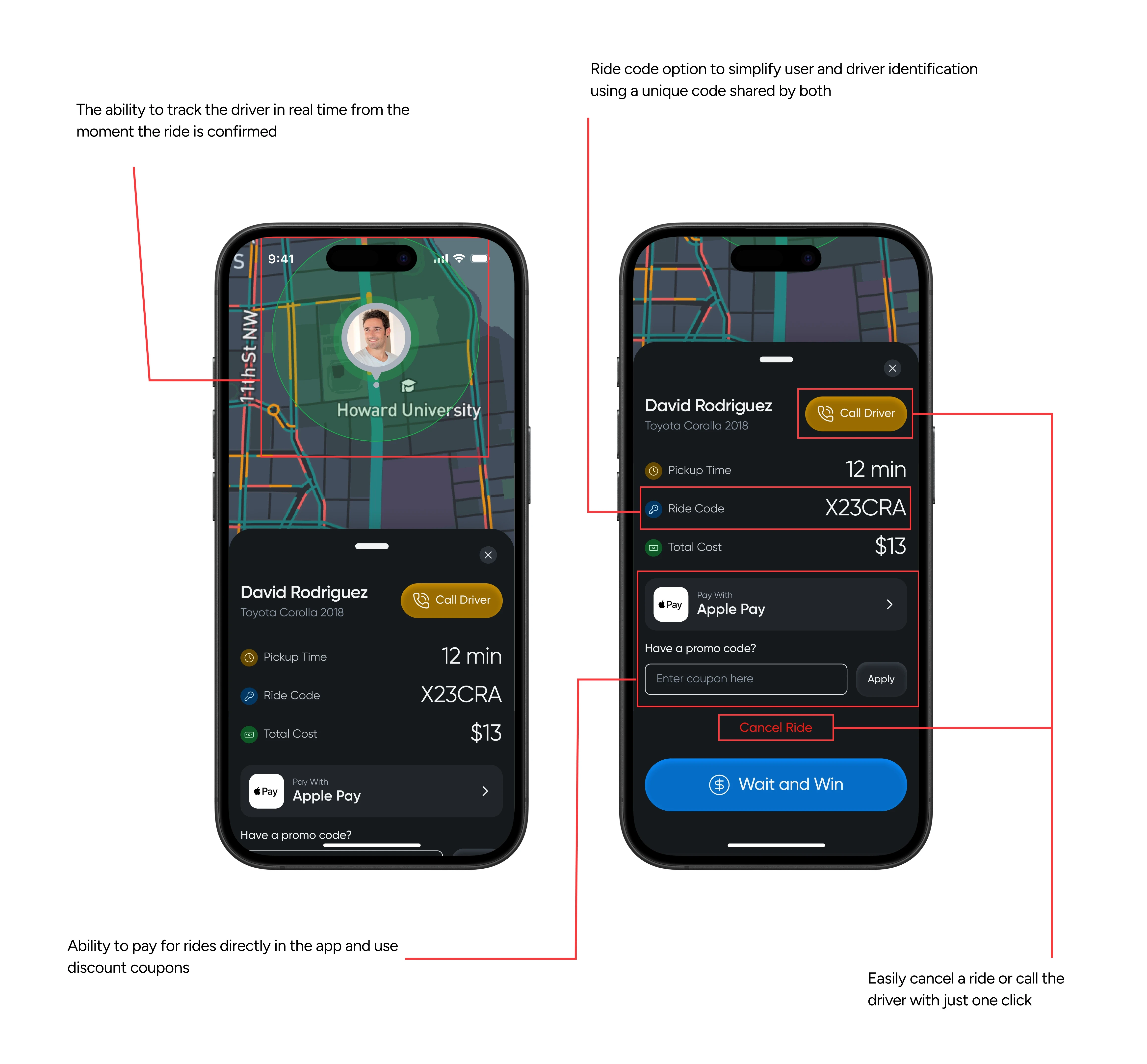
Once confirmed, the user can track the driver in real time on the map, see the estimated arrival, and use the Ride Code - a short code shared by both driver and passenger to verify identity without checking names or license plates.
Payment can be made in advance, vouchers can be applied, and users can cancel or call the driver at any time.
Once confirmed, the user can track the driver in real time on the map, see the estimated arrival, and use the Ride Code - a short code shared by both driver and passenger to verify identity without checking names or license plates.
Payment can be made in advance, vouchers can be applied, and users can cancel or call the driver at any time.
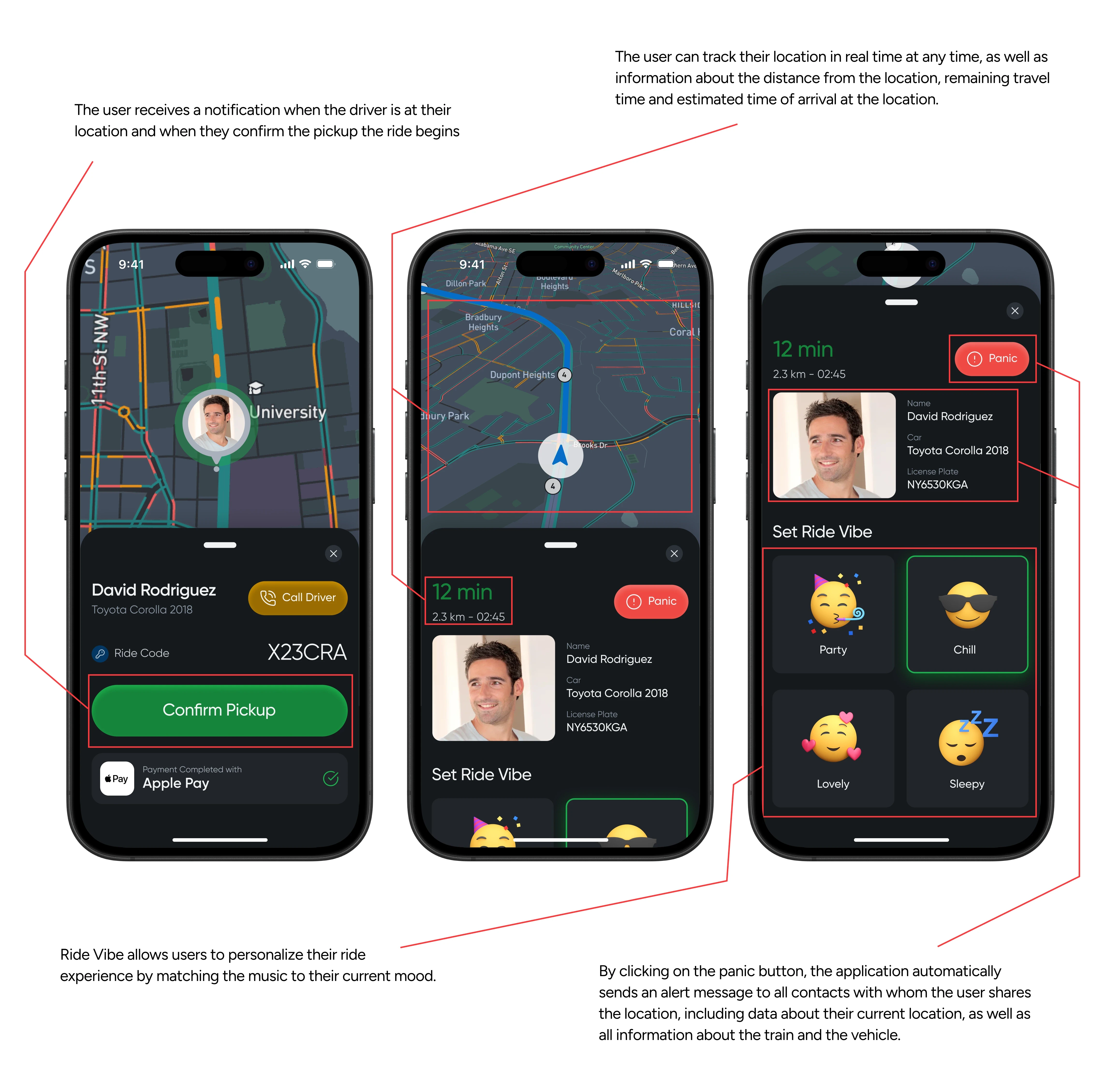
After the user confirms the pickup, the ride begins. They can track their journey in real time, seeing their current location, the remaining distance, and the estimated time of arrival at their destination.
After the user confirms the pickup, the ride begins. They can track their journey in real time, seeing their current location, the remaining distance, and the estimated time of arrival at their destination.
For safety, key driver information is always visible and prioritized on the screen. A Panic Button is also available at any moment - if the user feels unsafe, pressing it instantly shares their current location and driver details with all contacts they’ve chosen to share location with.
For safety, key driver information is always visible and prioritized on the screen. A Panic Button is also available at any moment - if the user feels unsafe, pressing it instantly shares their current location and driver details with all contacts they’ve chosen to share location with.
And to make the experience a bit more personal and fun, the Ride Vibe feature lets users set the mood for their trip, automatically playing a playlist that matches it.
And to make the experience a bit more personal and fun, the Ride Vibe feature lets users set the mood for their trip, automatically playing a playlist that matches it.
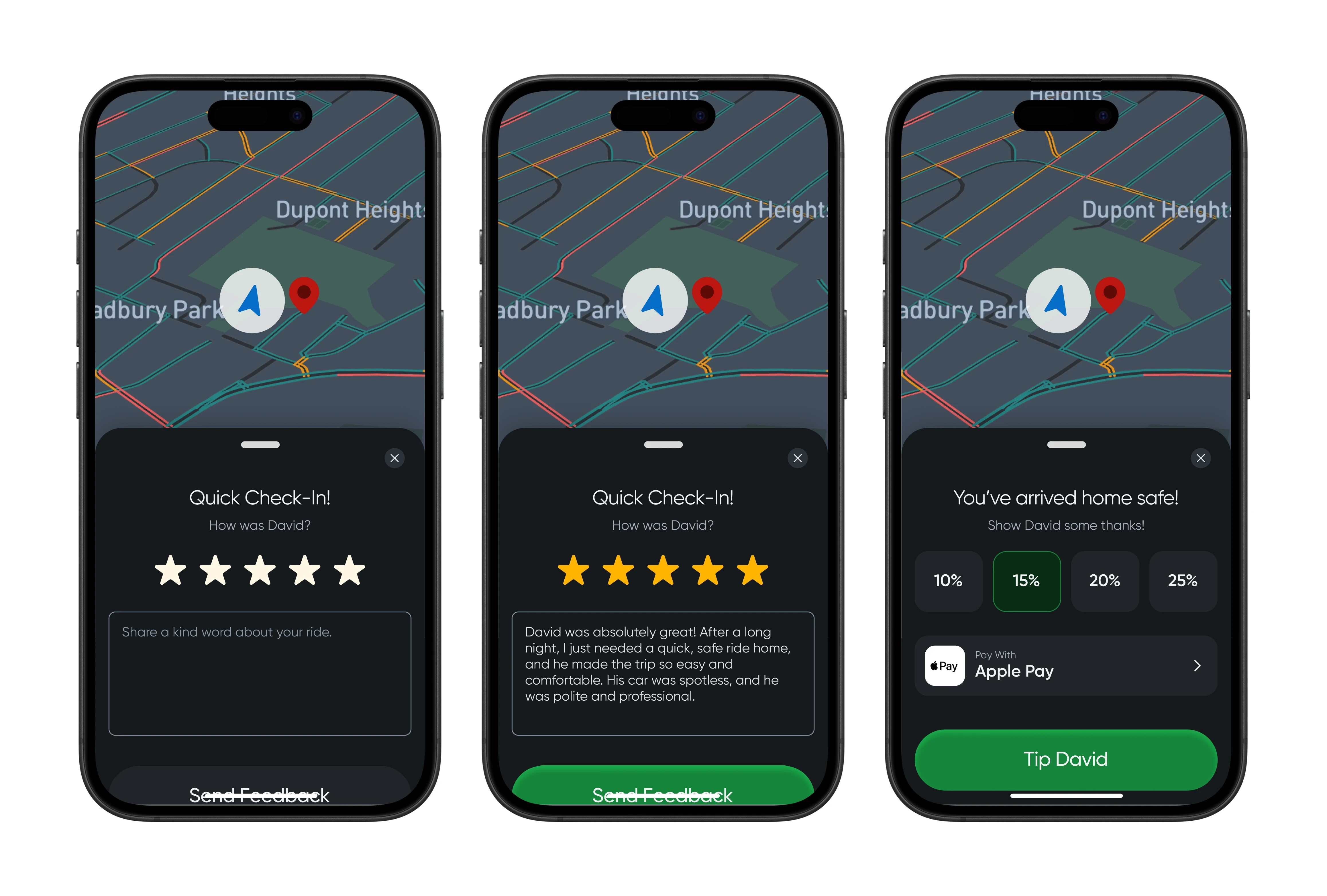
When the ride ends, the user is prompted to rate the driver and optionally leave a tip (10%, 15%, 20%, or 25%). After completing this step, they return to the Home screen, ready for the next ride.
When the ride ends, the user is prompted to rate the driver and optionally leave a tip (10%, 15%, 20%, or 25%). After completing this step, they return to the Home screen, ready for the next ride.
Find Friend Feature
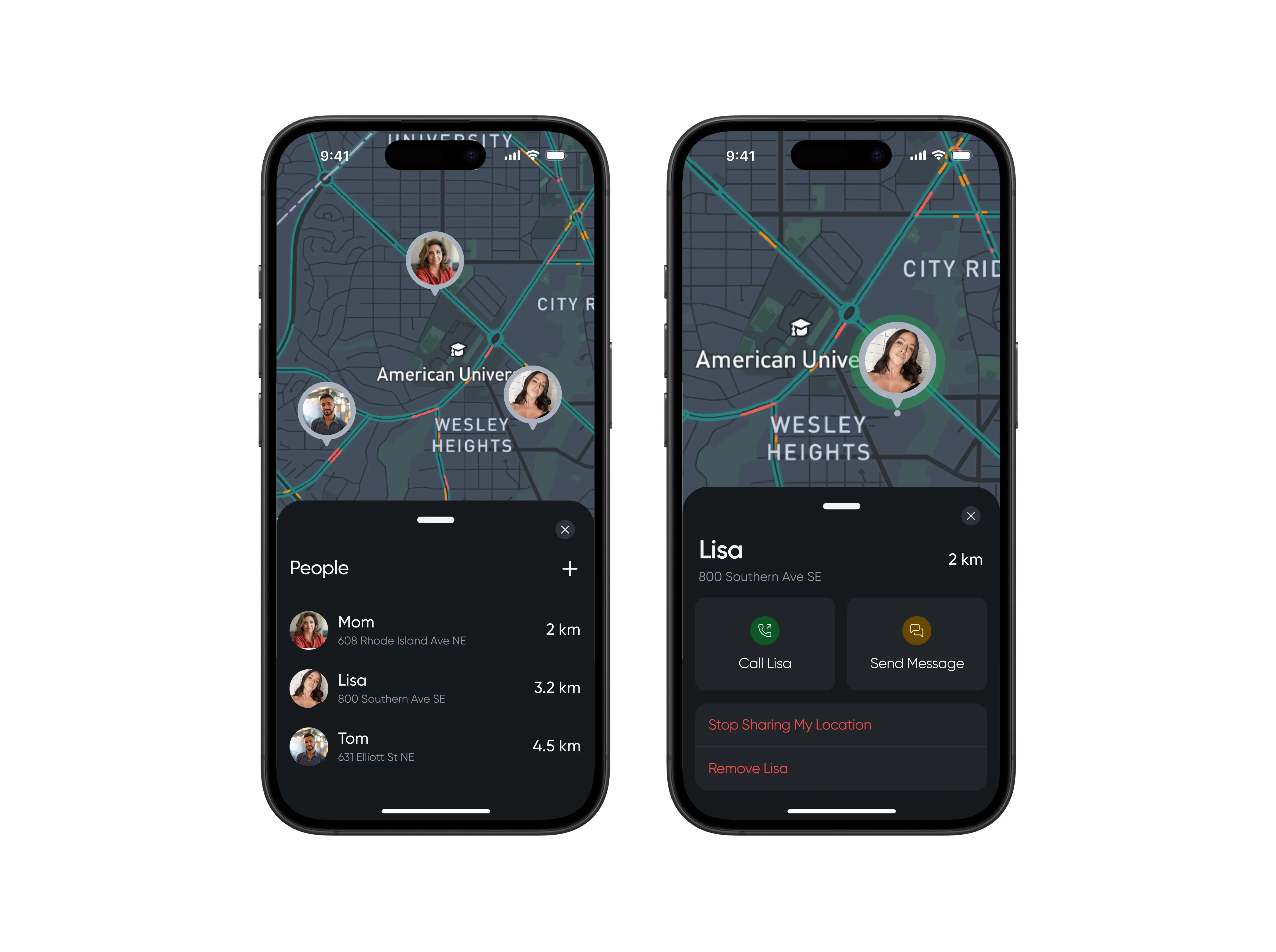
Another insight from the interviews was the strong desire to share live location with friends or partners during the night.
Another insight from the interviews was the strong desire to share live location with friends or partners during the night.
The Find Friend feature makes this easy - users can add as many contacts as they want and track them in real time on a map.
The Find Friend feature makes this easy - users can add as many contacts as they want and track them in real time on a map.
By tapping on a friend’s name, they can view detailed movement info or contact them directly via call or message.
By tapping on a friend’s name, they can view detailed movement info or contact them directly via call or message.
Smart Route Feature
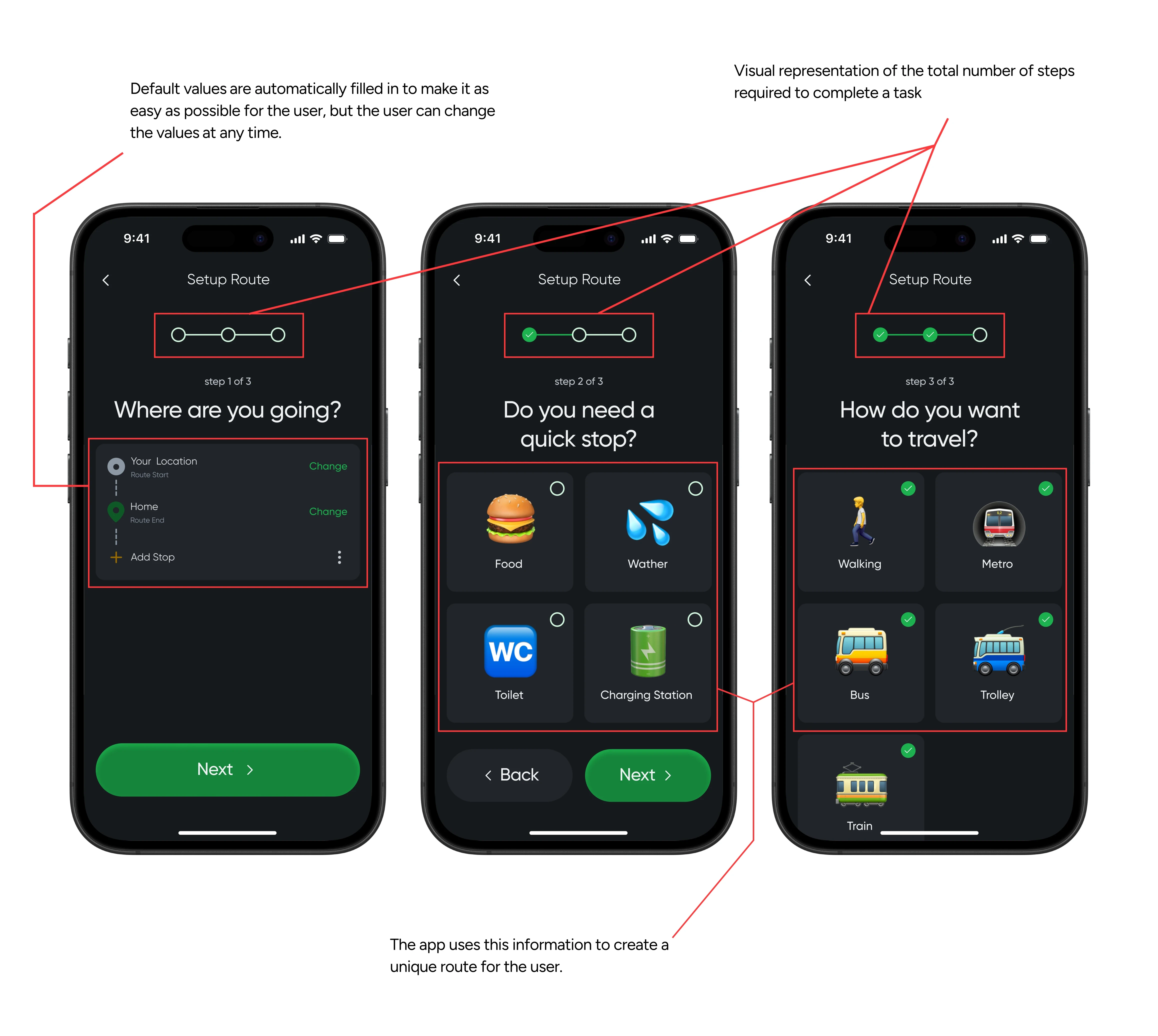
This feature is designed for users who are budget-conscious or prefer mixed transportation options. The app generates the cheapest and safest route based on user input.
This feature is designed for users who are budget-conscious or prefer mixed transportation options. The app generates the cheapest and safest route based on user input.
It consists of three main steps:
Setting start and destination points (auto-filled by default but editable).
Adding optional quick stops (food, water, restrooms, etc.).
Choosing transport types - by default, the app combines up to five (walking, bus, trolley, tram, metro), but users can deselect any they don’t want.
It consists of three main steps:
Setting start and destination points (auto-filled by default but editable).
Adding optional quick stops (food, water, restrooms, etc.).
Choosing transport types - by default, the app combines up to five (walking, bus, trolley, tram, metro), but users can deselect any they don’t want.
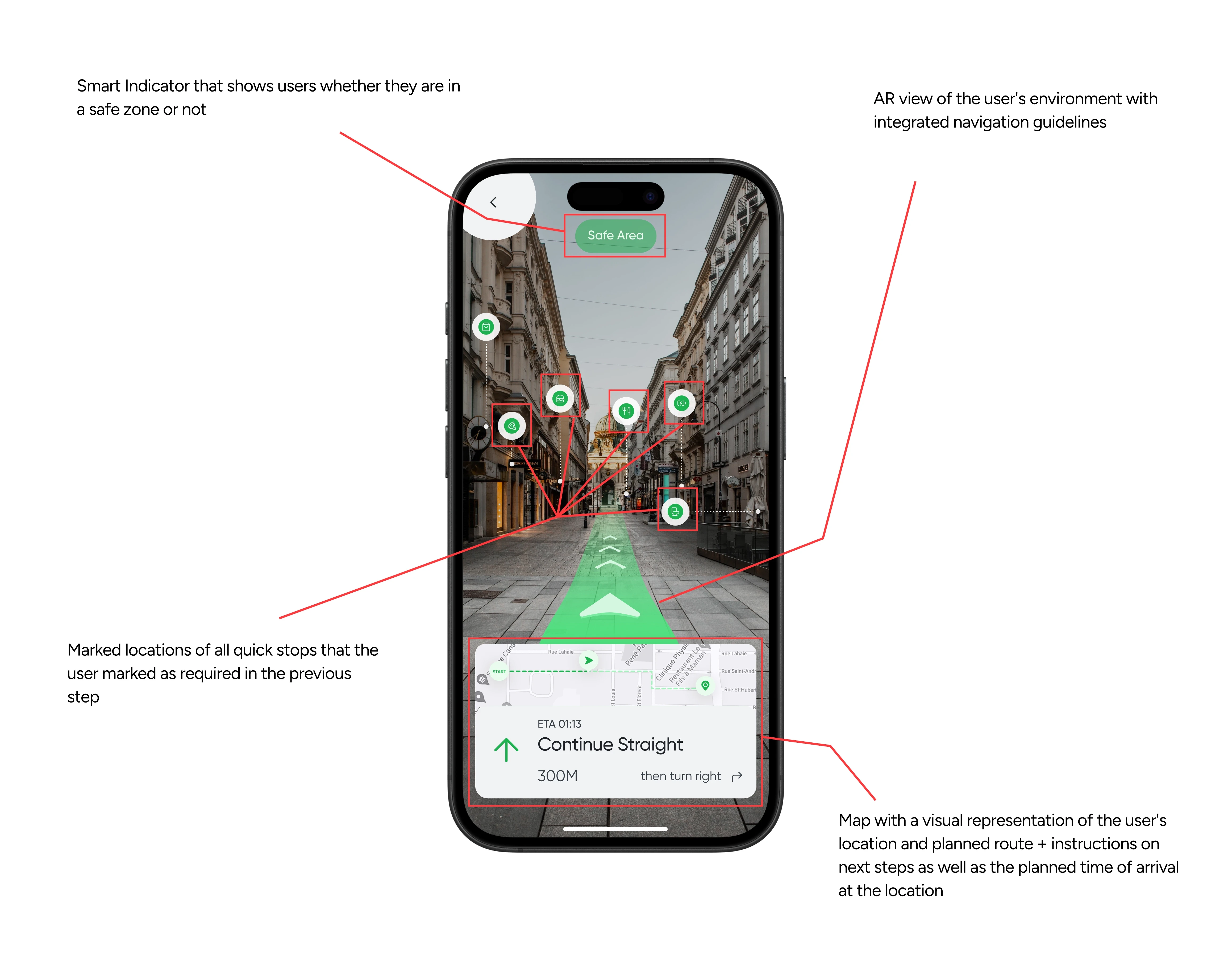
After input, Buzzi calculates the optimized route, displaying it on the map with all quick-stop locations marked and safety indicators for each area.
After input, Buzzi calculates the optimized route, displaying it on the map with all quick-stop locations marked and safety indicators for each area.
AR mode uses the phone’s camera to overlay directions on the user’s surroundings for easier navigation.
AR mode uses the phone’s camera to overlay directions on the user’s surroundings for easier navigation.
Wait and Win
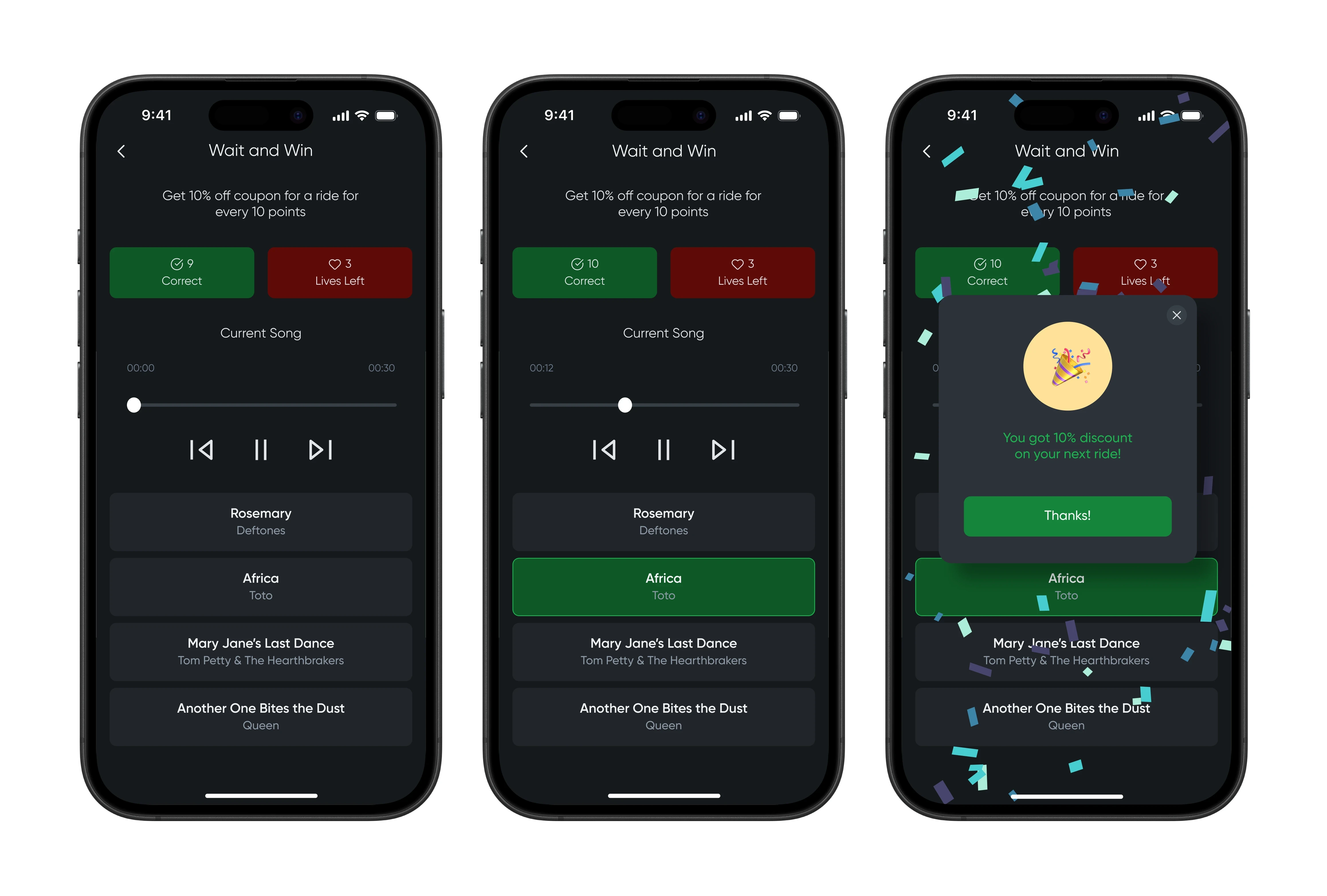
One of the biggest frustrations during late-night rides is waiting. To turn that moment into something fun, Buzzi introduces Wait and Win - a mini-game users can play while waiting for their ride or driver.
One of the biggest frustrations during late-night rides is waiting. To turn that moment into something fun, Buzzi introduces Wait and Win - a mini-game users can play while waiting for their ride or driver.
The game plays a short music clip, and users must guess the correct song from four options. Each correct answer earns points, and every 10 points unlocks a 10% discount voucher.
The game plays a short music clip, and users must guess the correct song from four options. Each correct answer earns points, and every 10 points unlocks a 10% discount voucher.
Instead of frustration, waiting becomes entertainment and a chance to save money on future rides.
Voice Assistant Feature
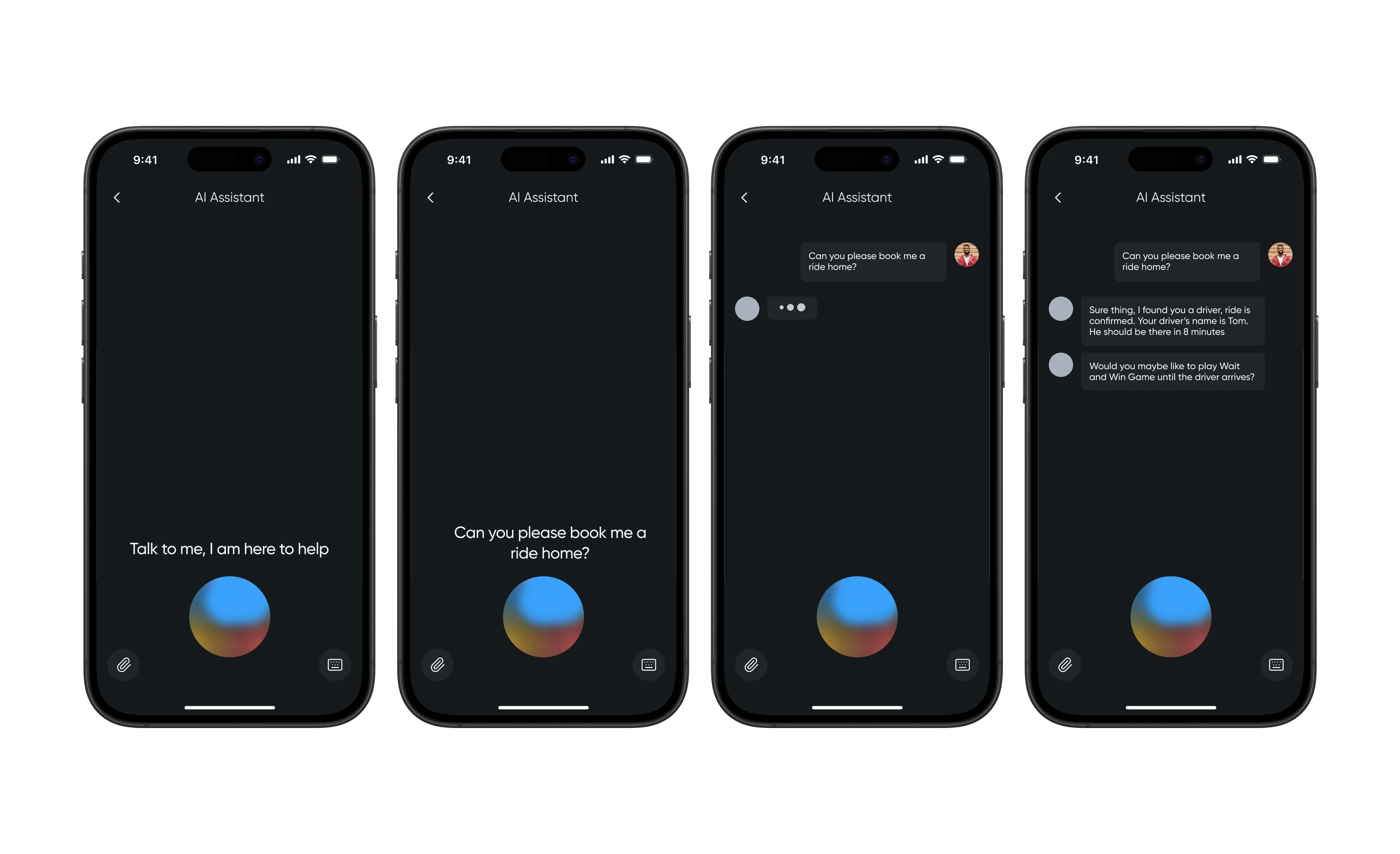
The Voice Assistant enables users to perform any key action using voice commands or text input. The interaction is presented as a familiar chat interface, making it intuitive even for users who are distracted or slightly tipsy.
The Voice Assistant enables users to perform any key action using voice commands or text input. The interaction is presented as a familiar chat interface, making it intuitive even for users who are distracted or slightly tipsy.
It’s simple, friendly, and requires minimal effort, perfectly aligned with the app’s mission.
It’s simple, friendly, and requires minimal effort, perfectly aligned with the app’s mission.
Step 5
Conclusion
Reflection
Buzzi is a concept that merges safety, simplicity, and fun into a single late-night experience. It addresses the unique needs of users who want to get home safely without unnecessary stress or effort, combining reliable navigation, smart automation, and a playful personality.
Buzzi is a concept that merges safety, simplicity, and fun into a single late-night experience. It addresses the unique needs of users who want to get home safely without unnecessary stress or effort, combining reliable navigation, smart automation, and a playful personality.
Next steps
If I were to continue developing this concept, I’d focus on grounding the design in real user behavior and refining the core experience even further. My next steps would include:
Testing the product in real life conditions to understand how tipsiness, noise, and low attention spans affect user interaction and safety decisions.
Evaluating different patterns to validate which flow actually reduces cognitive load in late-night scenarios.
Iterating on the app’s microcopy and personality to strike the right balance between clarity, warmth, and a late-night “companion” vibe.
Exploring edge cases (e.g., lost phone, poor signal, switching rides) to make the system more resilient and trustworthy.
If I were to continue developing this concept, I’d focus on grounding the design in real user behavior and refining the core experience even further. My next steps would include:
Testing the product in real life conditions to understand how tipsiness, noise, and low attention spans affect user interaction and safety decisions.
Evaluating different patterns to validate which flow actually reduces cognitive load in late-night scenarios.
Iterating on the app’s microcopy and personality to strike the right balance between clarity, warmth, and a late-night “companion” vibe.
Exploring edge cases (e.g., lost phone, poor signal, switching rides) to make the system more resilient and trustworthy.